
In the world of electronic dance music (EDM) and reggaeton, FL Studio is still one of the most popular digital audio workstations (DAWs). Some people even compare its popularity to that of Ableton Live among DJ superstars and modern beat producers.
Personally, I think FL Studio has some similarities to Reason. It has a modern and simple interface with many options for sound design, both for synthesizers and manipulating audio.
FL Studio excels particularly in the synthesizer department and comes with some excellent stock sounds. Companies have even started producing MIDI controllers that work well with FL Studio's growing popularity and impressive automation capabilities.
Top 3 - MIDI Keyboards for FL Studio
Preview | Product | Price |
|---|---|---|
 | ||
 | ||
 |
It makes perfect sense for companies to tap into the massive industry that FL Studio serves. I'm not talking about just recording studios and songwriters — I'm talking about live festival performances.
Fresh from Coachella, I spotted these controllers on the big stages through Instagram photos of at least three or four headlining artists. FL Studio has carved out an incredible niche that markets itself. You simply can't buy that kind of exposure.
So, if you're ready to elevate your FL Studio game, here are my favorite controllers.
The Best MIDI Controllers for FL Studio
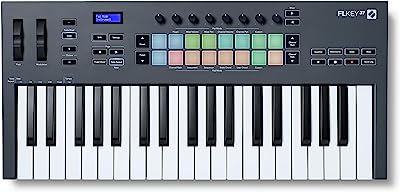
1. Novation FL Key-37
This European company knows a thing or two about electronic music; they've built some of the best analog and analog-modeled synths used in many dance productions. It makes perfect sense that they created a controller specifically for FL Studio.
One of the biggest user-based criticisms of FL Studio compared to Ableton is the amount of screen diving you have to do for each function. The Novation FL Key-37 is perfect for this reason.
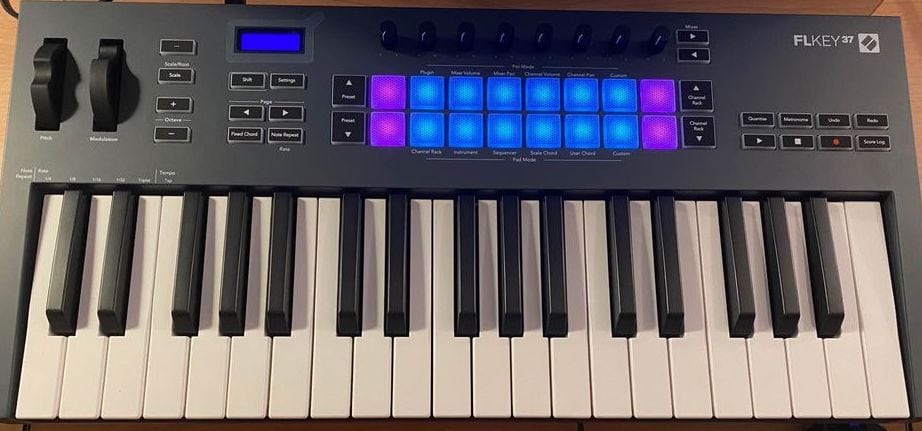
Novation FL Key 37
It has many designated functions to speed up the workflow while navigating windows. They even added quality pads that respond well to velocity, allowing you to create quality beats when used with FL Studio's super-tight MIDI response.
Another feature that I found super useful was the fact that you can access and choose plugins directly from the controller. It reminds me of the NI Kontrol that I often use. So, you can spend less time staring at the screen and more time being creative.
This controller is one of my go-to secret weapons when I DJ live. There are two main unbeatable features — one being that it comes bundled with the Novation Bass Station plugin modeled by the original creators.
The Bass Station is one of the most sought-after EDM and techno sounds in the world. Unlike the overused Moog bass sound, it's more modern. It still has grit and a great filter sound, but with tighter subs that translate beautifully on massive stage speakers like those at Coachella.
This feature is perfect for creating extended versions of tracks during your live set to surprise your fans. They've customized many functions that you can save as presets.
What I love to do live — and the crowd loves it too — is break down certain sections of tracks where I have stems, whether they're my own or someone else's. I'll play a new bassline over just a kick drum, add some filter sweeps, and create an extended remix on the spot.
I did this two weeks ago at a large warehouse gig in Los Angeles. I took Lady Gaga's new single "Zombie Boy" and broke it down into this minimal techno thing, then brought the track back after 5–6 minutes using the Novation's knobs to automate SoundToys FilterFreak as my main filter.
The musical keyboard and layout are so ergonomic and simple that it's amazing to use live.
The one aspect of the FL Key that could be better is the actual feel of the keys. I'm a pianist, so I might be more sensitive to that sort of thing, but they felt a bit stiff compared to other controllers.

2. Arturia KeyLab 61 mk3
This is hands down my favorite controller for FL Studio. It's packed with everything you could want for creative control. Plus, the French are total design pros, and the layout is top-notch.
The KeyLab 61 mk3's keys are seriously high-quality. It's always important to have great keys on any keyboard, especially if it's not a mini. A great controller can be your one and only synth if you're using a standalone version, so it should be super fun to play no matter your skill level.
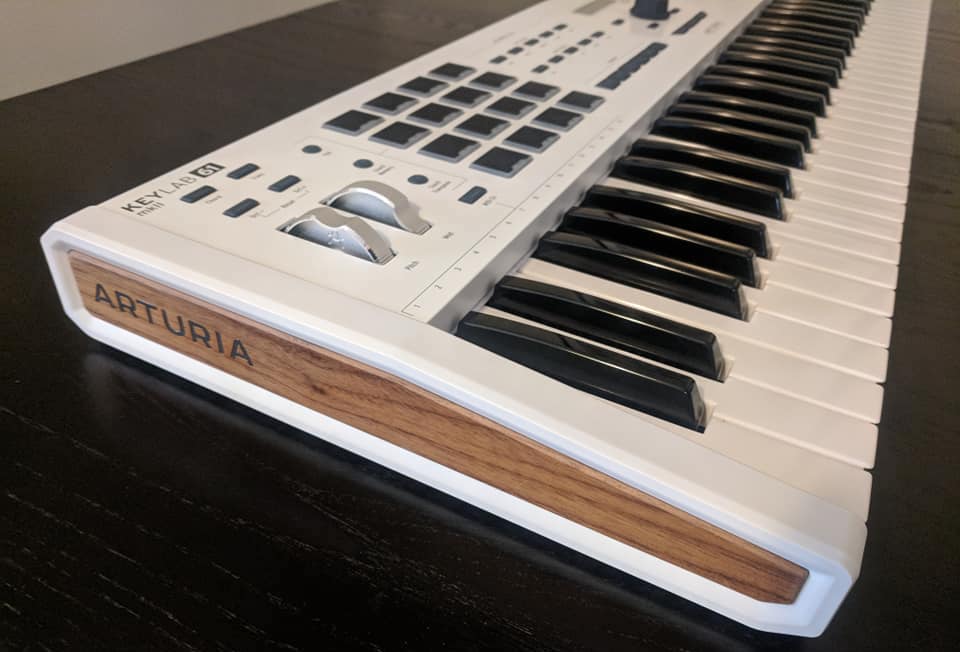
Arturia KeyLab 61 MkII. This is the previous gen. I haven't had the chance to click the newest one yet.
Even though this controller isn't specifically for FL Studio, it has one feature that makes it perfect for it, the Smart Control section. It has overlays for some of the most popular DAWs. And even if FL Studio isn't included, you can still customize this section and even make your own overlay.
Now, I'm all about sliders, especially since I'm also a film composer. And let me tell you, the Arturia sliders are the best I've ever used. Not only are they perfect for CC control, but they work wonders in FL Studio's mixer section.
When you see the new screen on this recently updated KeyLab, you're not gonna believe the difference from its predecessor, the Mk2, which was also a fantastic controller. They've also outfitted this new version with USB-C straight from the factory without any need for annoying adapters.
As soon as I heard about the Mk3's enhancements, I traded in my Mk2, since it's my go-to controller for remote production.
Though it's heavier than many other controllers, its incredible feature set makes it worth carrying wherever I need to produce.
One thing I always try to do with MIDI controllers is unlock their creative potential. I don't want to feel like I'm playing a MIDI controller — I want to feel like I'm playing an instrument, a synthesizer. That's why I love using what I call the "Brian Eno technique" with this Arturia.
Alessandro Cortini from Nine Inch Nails has been using this same technique with a Tascam Portastudio vintage cassette mixer. The idea is to assign each fader to a track containing a long ambient drone or stretched-out vinyl-style sample — the wobblier, the better.
You can use Mellotron sounds, weird reverbs, or even detuned background vocals from your own track. Then, capture performances by bringing these samples in and out with the faders, creating evolving pad-like sounds without touching the keyboard.
Why not just automate the volume of these tracks in FL Studio? Because performing with these amazing sliders will create happy accidents and quirks — that's the Brian Eno vibe. Listeners will wonder, "How did they do that? Is that a keyboard? A Mellotron? Is it a sample? It doesn't sound like a sample..."
It's unique and super cool, and out of all the controllers here, this is the one I use for that because it truly is like its own mixer. It's awesome. Try it out.
Okay, so here's my one small gripe: the aluminum build feels a bit cheap. Maybe it was made lighter for travel purposes, but it's kind of a bummer compared to the old Arturia controllers that felt way more solid.
Read more: our full Arturia KeyLab Mk3 review
3. Akai Professional MPK Mini MKIII
Alrighty, let's start with the obvious: Akai is hands down the best when it comes to drum pads. I've said it before and I'll say it again.
The spongy, fat, backlit MPC pads from their flagship MPC X are directly ported to this little guy, making it essentially an MPC hybrid controller.
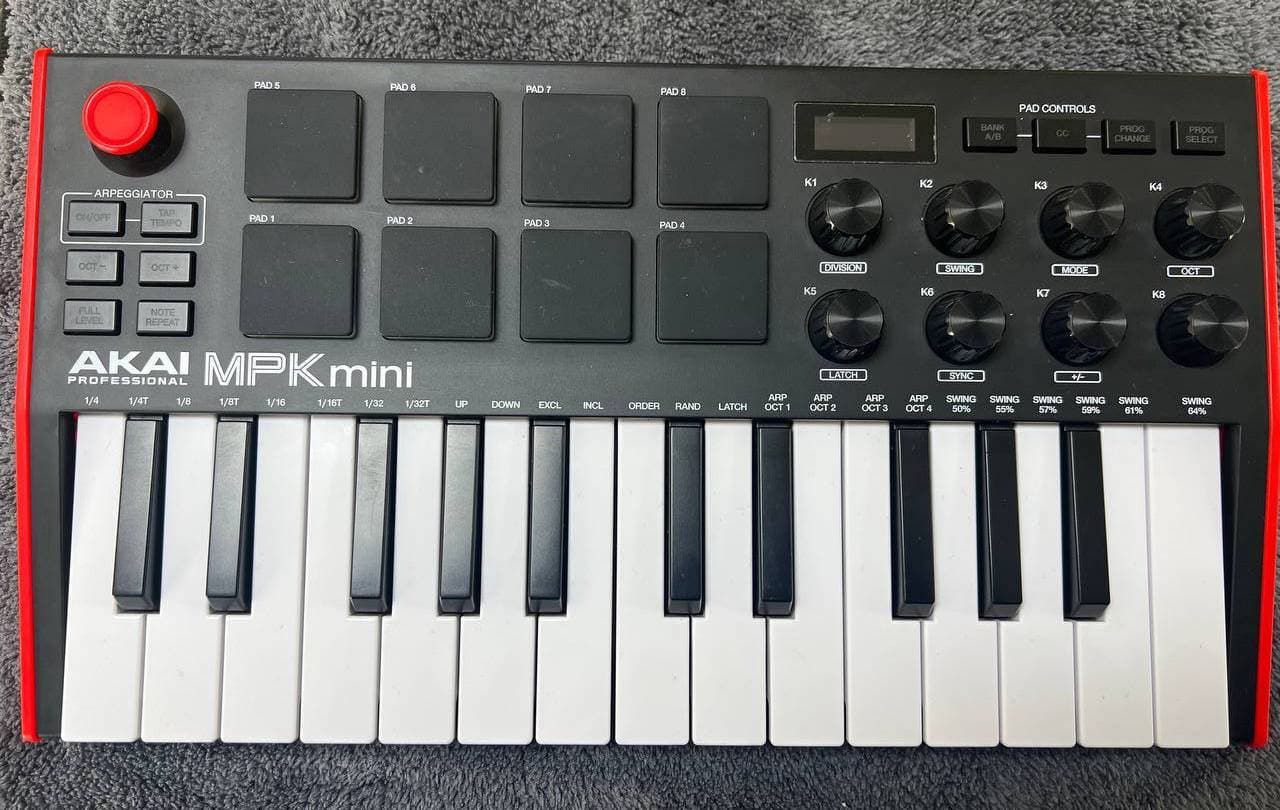
Akai MPK Mini
The MPK Mini's arpeggiator is really good, no doubt about it. Akai is known for having good MIDI timing, and the creator of the MPC, Roger Linn, once said that he tried to make the early MPCs feel like a funk drummer. The arpeggiator might be very precise, but it still has a good feel to it.
It's no surprise that this has become a hit in the hip-hop and urban music production community. While not everyone is trying to recreate a portable MPC, its compact size makes it perfect for producers who use standalone beat-making units.
I personally use it alongside my Elektron boxes for techno live sets, or in the studio when I want to step away from the computer for a more hands-on, synth-like experience. What makes it great is that you can use it to trigger melodic notes from the Digitone with the keys, while setting different channels on the drum pads to trigger sounds from the Digitakt.
The controller's popularity stems from its size, convenience, and intuitive design. Having this controller fit right below both small groove boxes almost makes it a sort of hybrid workstation. It's like having a little hardware recording studio workstation, with two sequencers, an FM synth with inputs for effects, and an incredibly punchy drum machine — all playable with a keyboard and pads.
It's not just for producers either; I recently worked with a drummer who mounted it next to his hi-hat as a drum pad. He would trigger samples for song intros, play his regular beats, and occasionally reach over to play the keys before returning to his drum set.
Its lightweight design and responsive pads make it especially appealing to drummers.
Another excellent feature that's worth mentioning is the endless or infinite knobs. These knobs not only feel great but also do the job of not changing the setting stored in a preset. If you've used Roland vintage synths before, you know how frustrating it can be when the slider or knob doesn't match the preset. This little guy has solved that problem.
Now, my only gripe with this controller is the joystick. I don't like how the pitch bend and modulation are controlled by the same joystick. They're two different types of controls, and it can be a bit confusing. It's not like the filter cutoff and resonance, which work together. I don't understand why they made this design choice.
Read my full review: Akai MPK Mini Mk3
4. Nektar Impact LX49+
Nektar is a relatively new player in the keyboard market. I first used their Panorama when I was heavily using Reason. I appreciated the design and integration, which aligns with their goal of seamlessly integrating software and hardware.
The Impact LX49+ is a midsize controller with 49 keys and 9 faders that have designated control pots. The keys utilize synth-action technology and have a nice feel. They have a bit more tension than I prefer, but that's beneficial for drum programming.
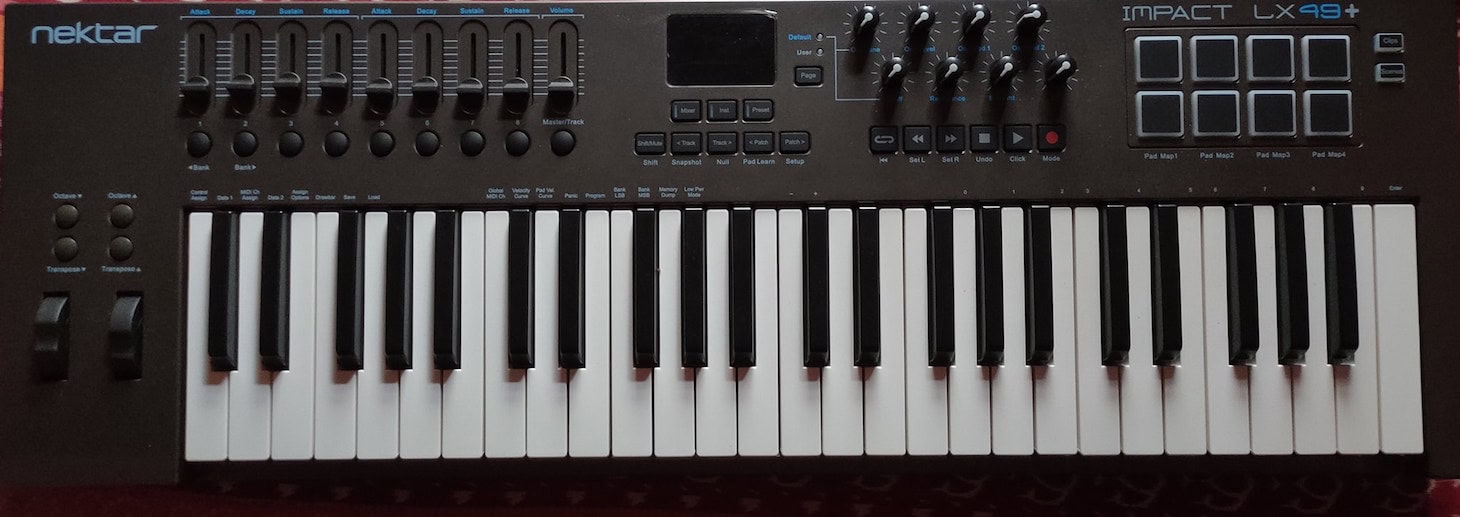
Nektar Impact LX49+
The transport, situated right of center with really nice-sized buttons, is probably my favorite feature. It's great to have a proper transport on a controller, which is missing from many others.
Another excellent feature is that the Nektar comes pre-mapped for many of the most popular DAWs, including Logic, Reason, Cubase, and FL Studio. This is fantastic since I found customizing FL Studio to be a bit complicated compared to Ableton.
The pre-mapping feature alone makes this keyboard worth adding to your gear collection.
Let me share how I use FL Studio instead of Ableton during film music recording sessions in Los Angeles. As a keyboard player performing alongside others — sometimes even with an orchestra — I often need to bring various gadgets, laptops, and equipment since you never know exactly what the composer or producer might request.
FL Studio excels in these situations. While many view it as just a DAW for urban pop or EDM, I consider it the ultimate environment for creating and managing ideas and clips.
It remains the most engaging and creative software for performing loop-based ideas live. This is where the Nektar becomes essential. Its ability to quickly switch between different MIDI CC settings is invaluable when recording multiple songs in rapid succession.
During sessions, we typically have only 2–3 minutes to prepare for the next song — it's an intense pace. Everyone must be ready immediately, and I can't waste time opening new laptop sessions just to adjust mappings.
For session or studio musicians who want complete control over FL Studio during live, in-person recordings, this keyboard is the perfect choice.
The control pots have very clear markings, so you know exactly where they are in rotation. While infinite knobs are still my favorite, it's nice that they assigned Filter Cutoff and Resonance dedicated pots for synth enthusiasts.
The pad section is the only weak spot for me. There are only 8, and the feel is not as responsive as some other controllers.
5. Akai Professional Fire Grid Controller for FL Studio
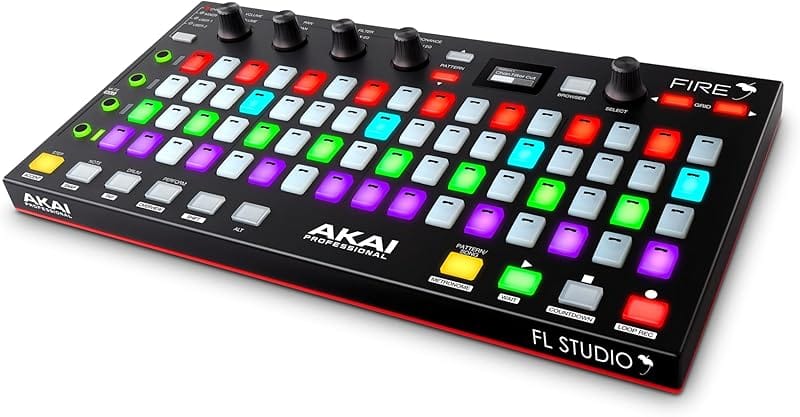
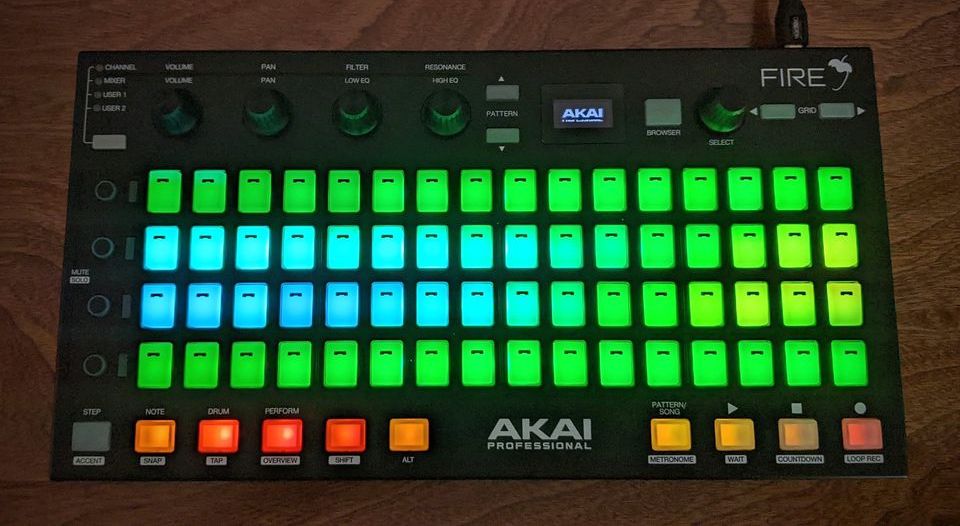
This thing is a game-changer. The Fire Grid Controller is the first controller dedicated to FL Studio, and it's seriously professional.
Not only does it have a killer 64 RGB velocity pad matrix, but you can connect up to 4 units for 256 dedicated pads. That's insane. Even Akai can't match that for the MPC.
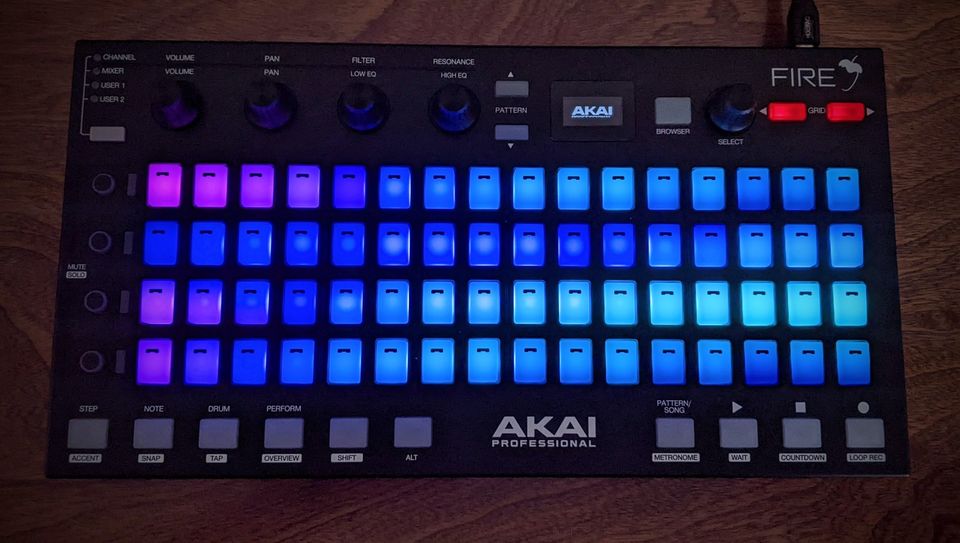
Akai Fire Grid Controller for FL Studio
The obvious comparison is that this is to FL Studio what Push is to Ableton. Everything is mapped specifically to one DAW. Again, since FL Studio is less intuitive for customization, this makes it much more fun.
It's also great for live performers. Having that many options to play and manipulate sequences live is fantastic. Add to that the capabilities of navigating the Tool Bar and Channel Rack seamlessly, and you're set for next-level performance.
I also love the size of it. Making it rectangular instead of square like Push and Launchkey makes more sense for FL Studio since the layout is more familiar with what's on the screen.
The transport on the bottom is also a nice touch. It's clear and simple to stop and play with easy reach from a keyboard controller.
The Fire Grid Controller is my other favorite session weapon for recording with bands, pop artists, and — on occasion — instrumental music and adding flavor to modern jazz.
Unlike the Nektar, which I use when playing live with other musicians in a live-room setting, the Fire Grid controller serves more as a producer's instrument during sessions. I've previously discussed my love for FL Studio's clip launching capabilities and its excellent piano roll features for both writing and recording.
The Fire Grid takes that workflow to the next level. Its perfect size allows me to sit next to a traditional mixing console and use it as a transport control. I can also set up a small workstation in the room to audition samples on a laptop as they're being tracked into the main session.
I route the loops I create at my FL Studio workstation to the main master session — often in Pro Tools — for recording. Using this controller, I can quickly build templates with various clips and loops, then audition them for the artist.
This thing is also amazing for customizing generic sample library loops from the likes of Splice and Loopmasters. There's nothing wrong with using premade loops — I mean, if you listen to Sabrina Carpenter's "Espresso," the intro loop is from a Splice pack by Oliver (see below), so everybody's using them.
That's also the problem: if everybody's using them, your music sounds kind of generic. Even that loop used in "Espresso" was treated with some filtering, some phasing, some kind of distortion, and it was well manipulated within the track.
For tasks like these, the Fire Grid is my go-to tool. Especially if I’m working with pop or electronic artists and bands.
My one wish would be to have a better screen though. This one is tiny compared to their Ableton competitors.
6. Arturia MiniLab 3
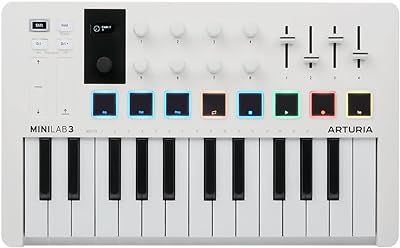
Arturia never fails to impress with its design skills, and the MiniLab 3 is no exception. It's amazing how they managed to fit a transport, arpeggiator, 8 pads, and knobs without crowding the surface.

Arturia MiniLab 3
They even have a full 5-pin MIDI out in the back for use with vintage synths and drum machines.
I own the Keystep Pro and have always loved the fact that Arturia includes presets. This one has 500 of them! They also include a bundle of high-quality instruments from UVI, NI, and of course, their own Analog Lab.
The chord mode is what makes this controller perfect for FL Studio. It's always been popular with electronic artists, and the FL Studio layout works well for chunk-based MIDI.
Consider legendary DJ and electronic artist Steve Aoki, who released an album called "Pillowcases and his Airplane Chronicles." He produced this album using FL Studio and Ableton with compact controllers while touring globally.
This is exactly where the Arturia MiniLab 3 becomes essential, not just convenient. Whether you're producing on a private jet or in economy class on a commercial flight, space is always at a premium in the air.
Plus, think about all those hours spent in airports or coffee shops during flight delays. Staying productive and creative is crucial, and you can't do that effectively with just a laptop's trackpad or mouse.
Among all these controllers, this one is a must-have — even if you end up choosing another from this lineup. It's simply a no-brainer. While there are other solid compact controllers out there (the Akai MPK being a worthy competitor), the exceptional build quality and generous bundled software package make this one hard to pass up.
Also, if music like Steve Aoki or deadmau5 is your jam, the arpeggiator is also great for creating some sick electronic patterns, especially since you can output the notes to other hardware via the MIDI output in the back simultaneously. It's time to start feeling like Giorgio Moroder!
I can't help but wonder why they put piano-style keys on a mini 25-key controller, though. It kind of leaves me scratching my head. It makes it harder to program drums and basslines without really making a difference to a skilled pianist.
Read more: my complete review of the Arturia MiniLab 3
Choosing a MIDI Controller for FL Studio
Alright, so when it comes to picking the perfect controller for FL Studio, you have to keep in mind that this DAW is pretty unique. From what I've seen, it's more geared towards programmers, producers, and sound designers, rather than performing musicians.
That's why the drawing and automation lanes are so great. They really help you get creative. So, in my opinion, there are a few factors you should consider when choosing a controller.
Musical Skills
Let's be real, nowadays you don't even need to know how to play a chord or what notes are in a scale to make a great track. With programs like FL Studio, most controllers have shortcuts for non-musicians.
For example, the Novation controllers have scale and chord modes that are extremely useful. You can create great ideas just by ear without any musical knowledge. In scale mode, it's easy to write bass lines that are pretty much foolproof since it eliminates any notes that aren't in the scale.
That said, if you're like me and you're used to writing on a piano or larger keyboards, the Arturia KeyLab has phenomenal-feeling keys that really take advantage of FL Studio's piano roll. So, you can have the cool modern features of FL Studio, but still make it as musical as possible.
Customization
FL Studio is pretty unique, so when you're picking out a controller, customization is going to be super important. Visually, it's simple yet deep and complex at the same time. There's a lot of window navigating and menu diving, so custom templates seriously help out.
I'd recommend going with a controller that's specifically designed for FL Studio. When you've got specific commands that have designated keys, faders, and knobs, it really takes the experience to the next level.
If you're somebody who needs a lot of MIDI CC customization per song, especially for live performances, the Nektar Impact is unrivaled. It's also incredibly well laid out so you can see what you're doing very clearly.
Also, grid-based controllers that are dedicated to FL Studio, like the Fire Grid, give you a complete visual guide to your arrangement. That's super inspiring for experimenting with instant rearranging and loop creation.
Performance Features
FL Studio is a powerful studio tool, but it's also great for DJs and electronic artists who like to perform live. If you're one of those artists, you might want a controller with some great live performance features. And no, you don't have to be a keyboard expert to use it.
For example, the MPK mini pads are perfect for dropping some sick beats, and the stacked Firegrid controllers let you get serious with your triggering.
But if you prefer keyboards, the Arturia Keylab might be just what you need for your live shows. Plus, it comes with some amazing samples to sweeten the deal.
Closing Thoughts
I love staying up to date with all the new keyboards and controllers coming out. I'm a huge fan of the NAMM show and spend almost every day jamming on every type of keyboard I can find.
What I've realized over the years is that the "in the box" way of making music always gets stale. Every year, more and more plugins, sample libraries, and virtual emulations flood the market, yet everyone is always hyped about the hardware.
You can see people shelling out $30,000 for a used Jupiter 8 on Reverb when the emulations are really darn close. What's up with that?
Then you've got the new Elektron magic box that pops up almost every year. And those Behringer remakes? They're so hot they can't even stay in stock for a day.
I think at the end of the day, tactile feel is what drives us. That's why dedicated controllers are so appealing. It feels like you are using a "real" version of a "virtual" program.
That's why Softube made the Console 1, SSL made the UF8, and Akai initially made the MPC Studio.
The same can be said for all these controllers. FL Studio has so much under the hood that is so cool when paired with dedicated hardware. Especially controllers like the Akai Fire Grid, which look like a mix of a Novation launchpad and a Roland 808.
It just makes you want to create with it.
