
While Apple is best known for the iPhone, iPad is the most popular tablet on the planet, with Apple cornering over 50% of the global shipment of tablets.
And for good reason – the iPad is just as feature-packed as the iPhone, but with a faster processor and, of course, a much larger screen. That makes the iPad quite the workhorse, with the ability to run multiple high-powered apps simultaneously, record audio and video, and edit footage, recordings, and photos.
But where the iPad can be found lacking is its audio recording capabilities. The inbuilt microphones, while not terrible, are certainly not the best for every situation. Anyone out there using an iPad to record audio will be able to relate.
So, I’ve compiled a list of some of the most popular external microphones for iPad, tried and tested them, and discussed some of the most important factors to consider when it comes to shopping for an iPad mic.
Let’s get into it!
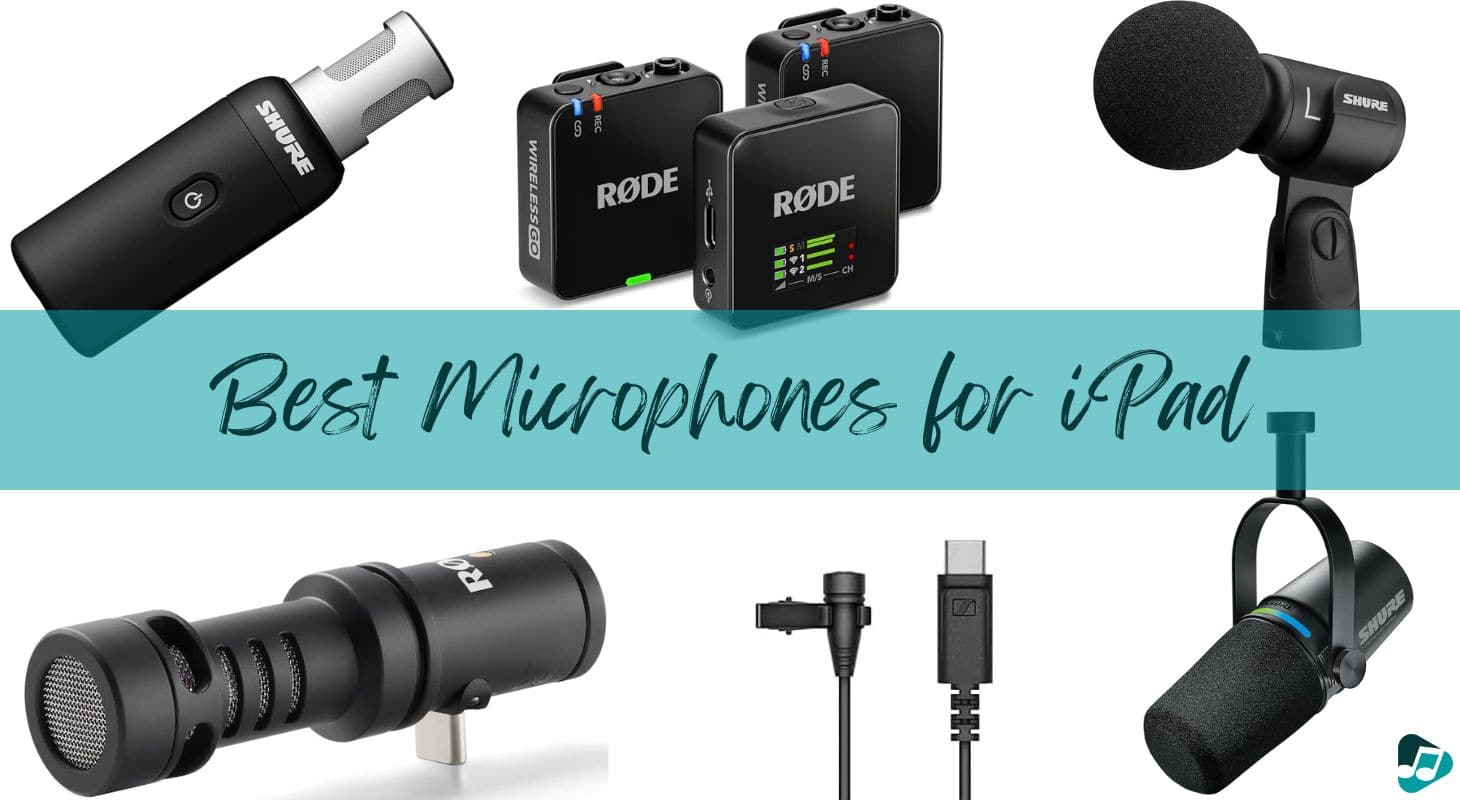
6 Best iPad Mics for Different Use Cases
1. Rode VideoMic Me-C+
Let me tell you about Rode — they're this wonderful Australian company that creates amazing professional-level studio mics. I'm actually a big fan and have several of their mics myself, including their amazing stereo studio microphone that I love using in the field and for drum overheads.
You might say Rode is like Australia's friendly counterpart to Blue Microphones — both make fantastic, affordable mics that I use often.
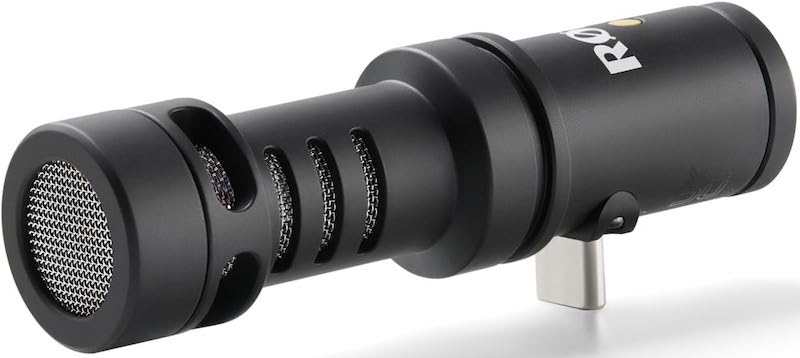
The VideoMic Me-C+ from Rode is a sturdy and dependable mic that features a USB-C input and a 3.5mm input jack for playback through headphones or other connected devices.
The mic itself looks professional, with a sleek aluminum outer casing and scratch-resistant ceramic coating. The USB-C connectivity is perfect for the latest iPad models, but Rode also offers the Me-L, a lightning adaptor version for older iPads.
Perhaps one of the biggest pulls for this Rode microphone is its compatibility and ease of use with the Rode Reporter App, a simple-to-use application available on the App Store that offers broadcast-quality, 24-bit recording.
They've also added a fantastic 48k bit rate and made it super easy to back up your recordings through USB! This high-quality sample rate is perfect for when you want to add these recordings to your DAW sessions, as most modern productions work best at 48k or higher.
I'm always reaching for this mic when I'm out capturing ambient sounds or recording outdoors in busy areas. You see, since Rode has so much experience making professional-level capsules for their sensitive studio mics, they really know their stuff when it comes to creating great directional mics.
Here's a helpful tip for capturing clean, direct field sounds in noisy environments without a shotgun mic — position the mic about 3 inches from the source for beautiful detail. I'm amazed at how well this compact mic focuses on exactly the sounds you want, without the sterile quality common to shotgun mics.
In terms of audio quality, it does an excellent job of picking up crisp, clear vocals and, with the help of the windshield, cutting down on background noise.
The built-in headphone amplifier's quality is noteworthy. It produces no hum and operates with no sound delay. This is a game-changer for filming dialogue or shooting outdoor scenes, as you can monitor audio through professional headphones in real time.
Some slight problems may arise if you have a case on your iPad, however. The USB-C input is fairly short, and as the mic is designed to plug in and sit close to the bottom of your tablet, if there is any kind of obstruction, it won’t fit. So, an extending USB-C adaptor, or a thinner case, or one with a cut-out will be required.
I found this Rode mic to be excellent indoors, but highly susceptible to even the slightest bit of wind noise when taken outside. If you plan on recording while out and about, keep the included windshield with you at all times!
2. Shure MV7i

Shure is one of the most trusted names in audio, and they’ve earned that respect by producing nothing but quality products, that are used throughout the recording and entertainment industries, over a span of nearly 100 years!
So when the MV7i appeared on the market, it drew plenty of interest. Straight out of the box, you can tell this thing is of professional quality and made to last.
Made from all metal and featuring a kickstand to allow you to prop the mic up on a surface, the wired connection and inbuilt Apple Mfi grants users a certified Apple-approved connection for iPhone, iPad, and MacBooks.
The presets are great for quickly switching between different recording modes such as speech, singing, acoustic, and instrument, giving a broad spectrum of uses.
The large diaphragm condenser and cardioid pickup pattern result in great sound quality that easily trumps the inbuilt microphone of an iPad. There is next-to-no background noise pickup and the Shure MOTIV app allows for further granular control over various parameters that you might want to tinker with to affect the outcome of your recording.
While this mic is slightly more expensive, it quite literally speaks for itself, as in this small, sturdy, multi-platform powerhouse you can find Shure’s legendary audio expertise, ready to go with your iPad.
If I were to describe the tone of this mic, it would be clear yet warm with a nice low-mid boost. This makes it perfect for podcasts or radio DJs.
Sonically, it has a classic quality of slight compression that gives vocals a lot of presence, but with more clarity than a condenser mic. This makes total sense — Shure has always been famous for having a combination of clean yet not sterile, warm microphones like the SM7B.
Another remarkable thing about this company is that they never rest on their laurels. Before this particular model, they already had a hit with the MV7+, yet they built upon and perfected it by adding a two-channel audio interface integrated into the microphone.
Why did they do that? Probably because most people using this microphone would degrade it or even ruin its fantastic sound by plugging it into cheap preamps or bad interfaces — I see that happen all the time.
So they foolproof it by adding direct USB-C connectivity. All you have to do is connect, make sure you're not clipping or distorting, and press record, and this mic sounds fantastic. It doesn't get much easier than that.
I found the cables that come with the mic to be a little on the short side, but we’re splitting hairs here really. This is an excellent bit of kit, and the only time a short cable would be an issue is if you’re recording on the go. But this Shure mic is best suited to a studio situation anyway – perfect for podcasts and music recording.
3. Sennheiser XS Lav USB-C
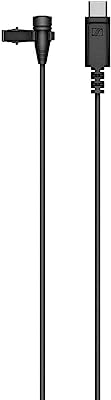
Sennheiser is another juggernaut brand with a tenure in the audio industry that stands to be reckoned with. The XS Lavalier mic is an omnidirectional mic that boasts great sound quality at a very reasonable price.
Included in the box is a removable windshield that fits snugly over the mic, and a clothing clip that can be used to attach the mic to your lapel or collar for hands-free use. This is ideal for content creators and video conferencing, as it allows you to attach your mic, turn on the audio pickup, and forget about it while you film your video or begin your meeting.
Sennheiser went to great lengths to make sure that the windshield was perfectly set on this microphone. One of the biggest issues with lavalier mics is the potential of bumping or rustling against the speaker's clothes.
It creates a horrible scratch sound akin to distortion, which then has to be edited out in post — and that's if you're lucky and it didn't happen over a crucial bit of speech or dialogue.
Of course, this usually happens without the speaker's knowledge, so if it's not corrected on the spot, you may lose a lot of your dialogue track. The protection on this particular mic from that happening is outstanding.
The USB-C connector forms a strong link with your iPad, and shouldn’t be hindered by a case as the input casing doesn’t stick out too far from the metal connector.
The best things about this Sennheiser mic are how easy it is to use, and how good the sound quality is. It’s a simple plug-and-play device, with no need to worry about installing any apps or software – although this does mean there’s no further tweaking available.
And in terms of sound quality, for a cheap mic with an omnidirectional pickup pattern, you’d be surprised at how crisp and clear your voice will come through on recordings. There is some background noise pickup, as is to be expected, but it’s nothing that will ruin your videos or be overly distracting on a video call.
Considering that this has the trademark Sennheiser sweet high-end that they're known for, I don't find it picking up much floor noise either indoors or outdoors. That's unusual because a lot of lav mics actually don't have a very extended high-end range precisely to filter out annoying background noise.
That would make sense since this mic is targeted almost directly at content creators, and professional audio is not really a requirement for YouTube videos or TikToks! With this in mind, the wired aspect of the connection may potentially be a hindrance to those wanting to film and record spontaneously, but the wire is nice and long (2 meters) and the connection is strong.
4. Shure MV88+
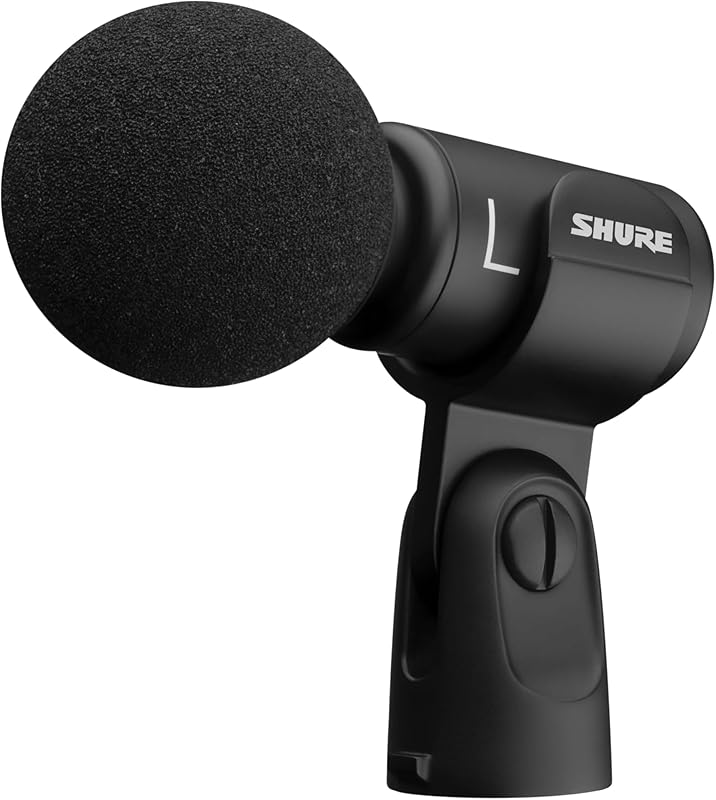
Shure is back again with another budget microphone for use with Apple devices. The MV88+ goes beyond its predecessor, adding better support for more iOS products through USB-C as well as better integration in Logic Pro.
The newly upgraded MV88+ comes with a 15-inch USB-C and a similar Lightning cable. The lengths work exceptionally well with the optional Video Kit setup—a must-have that really enhances the possibilities of this mic.
Since this is, in essence, a stereo mic because it includes mid-side capturing, having it on the proper video kit stand really helps you capture many moments with better quality. I for instance use this mic a lot when playing ideas or recording piano videos for either my clients or just general social media promotion.
The trick with a stereo mic is to have it correctly placed in an area where you're capturing a surround sound image in stereo.
Many people who use iOS recording microphones just point their phone in the general direction of the source and move around a lot. While you can do this with this mic, I think it works much better stationary — thus the video kit helps a lot.
I also use it to capture bands that are playing intimate sets or are filming TikTok or promo teasers for Spotify, and it works incredibly well, capturing the full image of the stage and room.
One surprising limitation of this stereo mic is its 24-bit recording resolution. While this is fairly standard — many competitors also use 24-bit — it's notable that 32-bit floating point has been available for years. Since most software applications, including Logic Pro, support 32-bit, I expected the plus version would offer this higher resolution.
Similar to other microphones that plug in directly, this can cause issues when most iPad and iPhone cases are taken into consideration. Without an extension cable or the removal of your iPad case, it’s highly unlikely you’ll get this thing to clear the case and make a solid connection.
Regardless of the standard resolution specs, the sound of this mic is full, with rich low-end, balanced mids and crisp highs, and further granular controls are available with the use of the ShurePlus MOTIV Audio and ShurePlus MOTIV Video apps, available for free on the iOS store.
This great sound quality is bolstered by the windshield, which makes recording outdoors a breeze, though you won’t be hearing any! The rest of the mic is of an all-metal design, so this thing is tough – but it can also be rotated and tilted to pick up audio from a certain direction, so it's perfect for content creators looking to film and capture great audio at the same time.
Given the impeccable sound quality for such a small and portable mic, the MV88 is perfect for just about every use case, from recording high-quality music tracks, to recording audio for podcasts, video conferencing, or just improving the overall quality of your videos.
5. Rode Wireless GO III
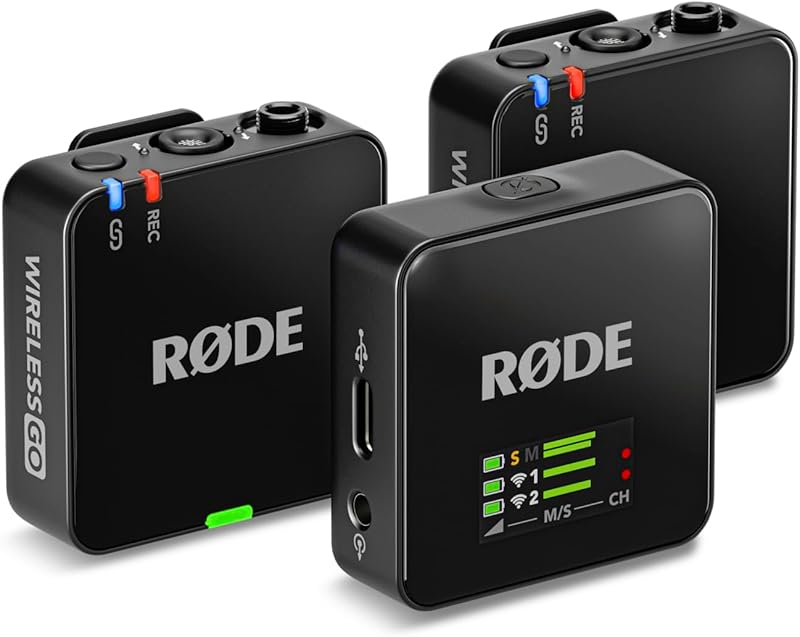
Chances are you’ve seen this Wireless Go III from Rode in a video on TikTok or YouTube, and after checking out the specs and quality of this thing, it’s not hard to see why it’s so popular.
What you get with this mic is three small boxes – two transmitters and one dual-channel receiver – all wireless. Also included is a set of cables, one of which is USB-C, so perfect for the latest iPad models. You will need an adaptor to plug into iPhone or older lightning port iPads.
The range is impressive too – up to 70 meters of wireless hands-free recording that starts the moment the transmitter(s) connect to the receiver, so you’ll never have to worry about turning it on or missing something.
The in-built storage is good for over 40 hours of recording time too, so you won’t need to keep checking the time to make sure your recording hasn’t stopped. The internal battery life is around 7 hours too.
The transmitters come with great little rubber clips with nodules that attach and hold very well to clothing or to a selfie stick.
In terms of actual audio pickup, the transmitters are fitted with omnidirectional mics that include an AI-based noise suppression which works wonders to filter out background noise and wind sounds. If that’s not enough, or if you’re recording outdoors somewhere particularly gusty, two screw-on fluffy windshields are included too.
What's also impressive about this mic, and I have to give major props to Rode, is that the resolution is a true 32-bit floating point. That means that you get a bit more range in the headroom and can capture sources not only with a fuller sound but also with a little bit more leeway to prevent clipping or distorting.
This has been a great feature for me because I use this mic often to record very loud signals, and I actually love it for hip-hop videos. Even though I technically doctored up the original sound for videos that are going to be featured on Spotify or TikTok, sometimes I have created remixes where I use the Wireless GO to create a brand new section of the song specifically for the dance video.
This is hard to do because if you don't have the luxury or budget to go back into the studio to produce a remixed or extended version, then you have to make sure that when you're capturing whatever new idea you're creating live, it's good enough to be able to match up and blend with the original mastered produced sound.
I've done it more than a few times, and the Wireless GO has exceeded my expectations.
A couple of downsides I noticed was the lack of any sort of protective case. As these mics are all wireless, and you’ll likely be transporting them around to wherever you want to record content, the soft pouch bag that Rode provides with the mic doesn’t always quite feel like enough.
Additionally, you have to be careful with omnidirectional mics in general, and this one is no exception. Even though the rejection and AI features do a great job of recording mostly clear signal when outdoors or filming on location, you should still monitor your audio constantly because no outdoor shoot is perfect.
The cables used for connecting the mics to a computer/iPad are a little on the short side as well. This is not a dealbreaker, but something to bear in mind as it can be frustrating.
The sound quality, ease of use, and almost unbelievable range of these mics make them well worth the money.
6. Shure MoveMic 88+
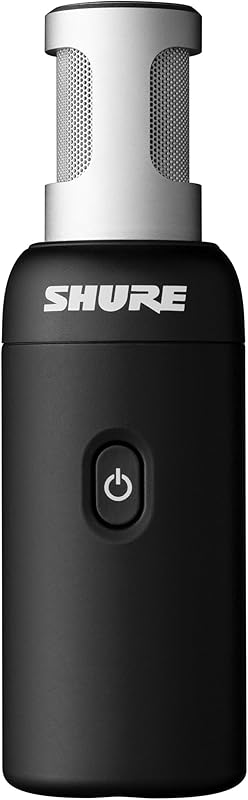
The Shure MoveMic 88+ takes an already great microphone design and makes it wireless.
While this was an expected move to keep up with competitors like the Rode Wireless GO, it was still a brilliant move on Shure's part because they also beefed up the DSP and post-production abilities of this microphone.
I know there are countless uses for wireless microphones these days — everything from journalism to capturing birthday parties — but I have a feeling that if you're on this site, you're probably interested in how you can use all this advanced technology to improve your music marketing campaigns. That's certainly why I bought one of these mics.
The new standard for promoting yourself as a musician or artist is giving fans an authentic behind-the-scenes look at your creative process. This approach consistently leads to higher engagement with your audience, in my experience.
So getting a mic like the MoveMic that has everything you need to basically capture clean audio and post without any editing needed is extremely useful.
This mic comes jam-packed with features like four selectable polar patterns (including adjustable stereo), five-band EQ, compression, and a limiter, which is always on to help prevent accidentally peaking and distorting your audio.
For all of you who aren't very experienced with audio engineering, mixing, or just don't want to spend time fiddling around with EQs, this mic also comes with five very useful DSP preset modes that get you going quickly.
I myself use these presets often because since Shure is very in tune with the music community, they also added two DSP presets specifically for singing and acoustic instruments.
Another feature that doesn't get mentioned enough is that these small wireless microphones also have an integrated headphone output. Coming from recording vocalists in the studio, I am aware of how latency can be a nightmare when you're trying to sing along to a track.
Latency is that slight delay that happens from when you sing to when you hear it back as it's recording — it usually happens when your processor isn't fast enough and you have to use a larger buffer size.
Having a headphone output directly on the microphone bypasses all the need for any tech workarounds and lowering buffer sizes and all that nonsense.
It saves time and it keeps you focused on what's important: capturing great ideas.
Again, I'll mention that I'm disappointed that this microphone maxes out at 24-bit depth, but it still sounds as amazing as you would expect from a Shure microphone. Nice round, deep low end and warm low mids. You get a crisp but clean high-end for vocals.
For serious creators on the go making modern music videos, this might be my top recommendation.
Buying Mics for iPad - Key Things to Consider
So, by now you’re probably thinking how you make the choice between all these great mics on the list? Which is the best mic for you?
Well, whether you’ve got an iPad, iPad Pro, or iPad Mini, there are certain things to consider when looking at external mics to improve your audio or video recordings.
Connectivity
This is one of the main factors to take into consideration, as not all mics offer model variants for different connector types.
Depending on the specific model of your iPad, you will either have a lightning or USB-C input, into which the microphone you eventually choose must fit.
If you’re unsure what your input is, or if you haven’t bought your iPad yet and are still making your mind up, I’ve made a quick list of all the iPad models that have a USB-C port. All others will have a Lightning port.
- iPad Pro 11-inch (1st Gen or later)
- iPad Pro 12.9 inch (3rd Gen or later)
- iPad Air (4th Gen or later)
- iPad Mini (6th Gen or later)
- iPad (10th Gen or later)
Sound Quality
This one goes without saying, but you need to consider how important the sound quality of your final product really needs to be.
Sure, you’re probably shaking your head right now and saying: ‘As good as possible!’ And I hear you! But that means spending more money, investing more time into tweaking and editing your audio files via apps and software, and less time making and uploading content.
Consider how your content is going to be viewed/listened to. If you’re recording audio that you hope to release on services like Apple Music and Spotify, you probably want to aim for the best audio fidelity that you can afford.
If you’re looking for a mic to improve the audio quality of your TikToks (which will be viewed on a mobile device anyway), then it’s probably of less importance overall.
Do you want to improve your iPad’s standard audio quality, or take it to a whole new level? Answer that, and you’ll know the kind of price range you need to be looking at.
Features
You should also consider how much expertise you have in dialing in compression, EQ, and other audio capturing techniques. If you're someone who loses their flow when having to think too technically, then I suggest you go for a microphone that comes with presets to dial this in easily.
Another important consideration is whether or not you need a stereo microphone or can get by with a mono signal.
This might be very important down the line, as I was explaining in my own experience with creating extended on-the-spot videos using previously mastered tracks.
Pretty much all the music you hear these days comes in stereo. Sure, there are some cool tools and tricks to make mono tracks sound stereo-like, but here's the deal — if you're using a preexisting mastered track for your video, you'll definitely want to grab yourself a stereo mic for that.
It will save you a lot of time and money later on.
Apps/Software
Once you’ve determined the most important features and what sound quality you feel is worth paying for, there’s the question of how much editing and fixing you might need to do in the backend. It’s no good having the perfect take if you need to chop, splice, fade or add effects to your audio to fit your intended purpose.
Many mics work alongside brand-name apps in which you can trim your audio gold to your heart’s content. If this is something you’re going to need to do, a simple plug-and-play mic might not be the best fit for you.
Conversely, there is a whole host of third-party apps, both paid and free, which can meet these needs for you. If you’re already familiar with these apps, a mic that includes another one which you’ll have to get used to might not be at the top of your list.
Bear this in mind when making your final decision!
To Summarize
If you’re looking for the best mic for your iPad, iPad Pro, or iPad Mini, you’ll almost certainly find it in one of the products in this list. Make sure to bear in mind a few things: your budget, your needs, and the port on your particular iPad.
People often say that a great video is nothing without great audio to match it. I mean, no one’s going to watch content that looks great but sounds like it was recorded from the back of the room! That’s especially true if you’re making content based on music, podcasts, or anything that relies heavily on conversation.
Weigh up all your options before committing to a purchase, and don’t forget that something that plugs directly into your iPad (without cables/wireless capabilities) will more than likely require the removal of your case!
Good luck!
