
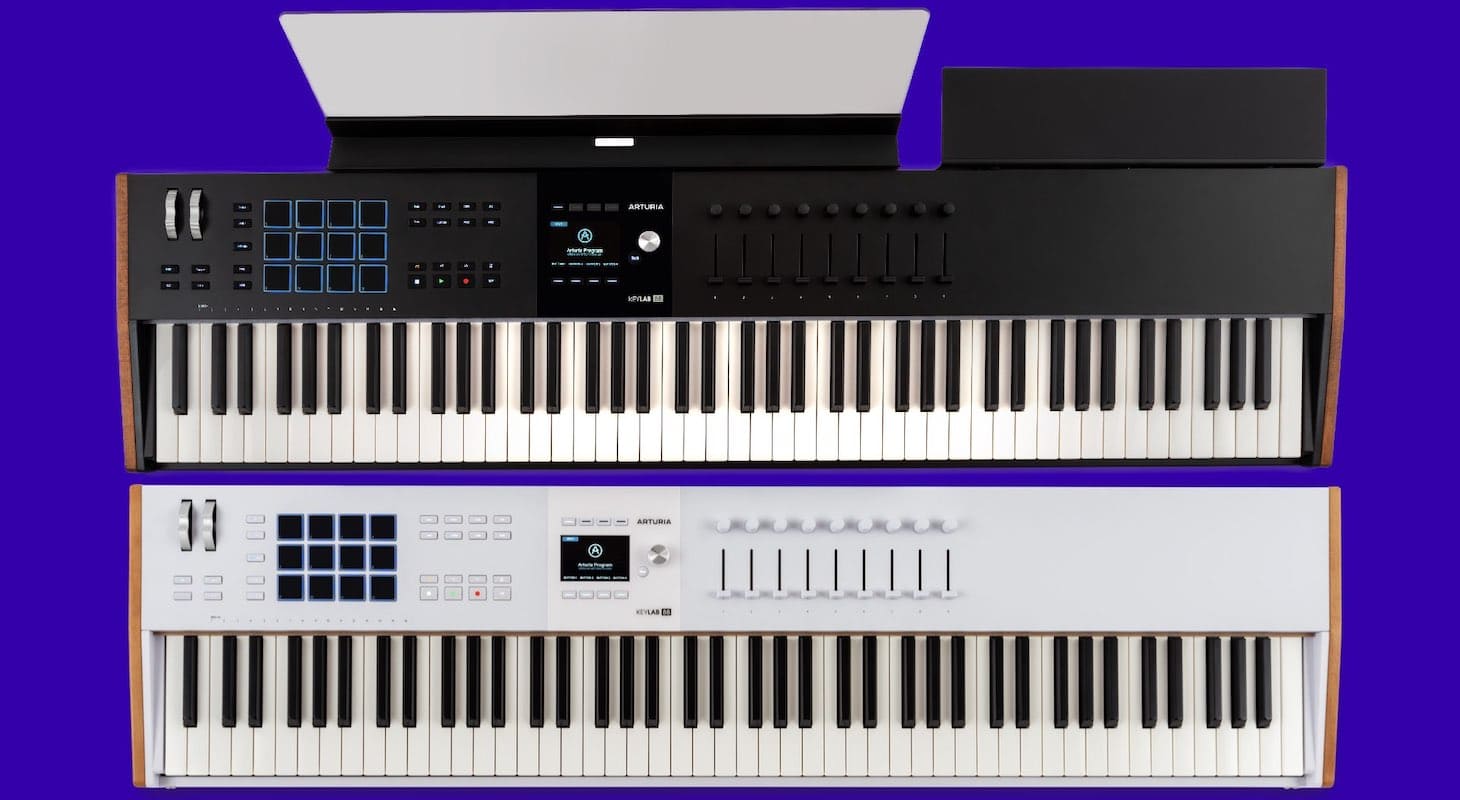
One of the greatest contradictions in music production is the irony that as computers get better, faster, more beautiful, and packed with everything musicians could dream of to make great tracks, the more musicians and producers want to get away from them.
You see it all the time — the more plug-ins come out, the better the original hardware sells. It's quite funny and very real that musicians and producers have an inherent need for a tactile approach, even when most of what they're using is "in the box."
Great companies that survive (and thrive), like Arturia, have always had their finger on the pulse of this mentality. They keep demonstrating this understanding with their premium keyboard controller lineup. The Arturia KeyLab mk3 which in its third revision has made one of the best keyboard controllers ever made, possibly even better.
I'm a huge fan of this keyboard series, and let me run you through some of the ways I use it daily for all my music.
Quick Overview

A premium controller with a clear display, deep DAW integration, solid faders, and smart drum pad banks. Cuts down screen time and keeps both studio work and live sets more hands-on.
Reason #1: Incredible New Display
One of the challenges instrument companies face is creating controllers that feel like instruments to producers and musicians, despite not having internal sounds. The key is providing enough visual feedback to create the impression that sounds are preloaded in the device.
This explains why each revision of the KeyLab series offers improved feedback about how manual adjustments on the controller affect your main session. While many producers and artists prefer to avoid staring at computer screens during creative work, whatever alternative they use should clearly show what they're working on.
Personally, I've always found Akai lacking in this department. Even their great MPK series dating back years had tiny screens. I enjoyed working with them because of their limitations, swing, and creative possibilities, but I still needed to check my main computer or laptop to see my position in the song or which parameters I was syncing with.
The KeyLab series perfectly fills this need for me because I constantly need velocity-sensitive drum pads for making beats. I'll explain how I use drum pads later in this article, but what I love about the screen's integration with my main session is the clear feedback it provides — showing which drum sound I'm using, which parameters I'm adjusting during editing, and other important information. This allows me to stay focused on my instrument rather than being glued to my laptop screen.
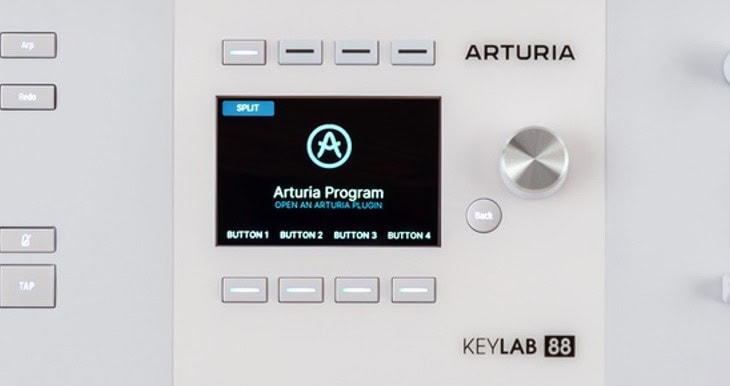
Arturia KeyLab Mk3 - Display
Another feature I've always missed in most controllers is the ability to truly glimpse the main DAW session from the controller screen. Besides Native Instruments' Komplete Kontrol series, I've never seen such good integration feedback as I have from this incredible 3.5-inch screen. I'll discuss this further in the next section.
Reason #2: Integration with DAW
I'm pretty sure by now all of you know or own some sort of Arturia synth or effect. You know just how meticulously modeled all their products are — from their Minimoog to their Culture Vulture effect plugin. If they release it, it means it's going to be a spot-on digital recreation of the real thing.
When I saw that one of the main talking points about this Mk3 upgrade was the DAW and software integration, I was incredibly curious. After trying it, I'm quite blown away that throughout the whole series, no matter what size the controller is, you get a screen where you can really dial in specific settings.
This is incredibly useful for me in two ways. First, I always use Arturia products live because they look cool with the wood paneling and aluminum frame. Second, because of how they interact with the Analog Lab software.
I used to have to bring an Ableton Push with me to gigs because Ableton is my main software, both during rehearsals and to run stems of my live set on stage. When you're running clips in Ableton, it's pretty safe overall, but you do need visual feedback as to which row of stems you're on or which clip is being activated next.
The KeyLab Mk3 integrates amazingly with Live. Not that it replaces a dedicated grid pad controller like the Novation Launchpad, but it shows enough detail to navigate the basics of a live set.
Also, I would say that for 80% of the synths I use in my live show — even if I used the real hardware in the studio during the making of an album — I recreate the presets and settings on my Arturia software. So the better the integration with the Arturia software, the better I feel about my virtual synth setup working flawlessly on stage.
And for all you artists who use a lot of electronic elements like me — whether you're doing pop, EDM, or lo-fi hip-hop — having all your synth sounds organized from song to song is a lifesaver, as many of you know. For that reason alone, using this keyboard live is completely worth the upgrade.
Reason #3: Sliders with Potentiometers
Going back to my initial assessment that musicians, artists, and producers are really looking to get a tactile feel when creating music "in the box," there's nothing more tactile than the feel of faders.
I grew up learning engineering on SSL mixing boards, and then I went on to all the digital boards that came after — from Yamaha all the way to Venue, Avid controllers — and I will say that I always got better results moving faders than by doing it on a trackpad or mouse.
When companies would come out with their standalone fader units like the Softube Console One, I was always the first in line to buy it. It's not just for mixing either. I have always used several techniques which involve faders.
Many times I'll layer different synths in my live set that will all be triggering polyphonic sounds, and I'll start moving up phases of different layers.
For example, I might start with a darker filtered pad, which I raise on fader one. Then fader two might add a bit of an FM synth to give it a digital edge on top for the melodies. Fader three might bring in more of a vintage string sound from something like an ARP string machine, etc.
Using faders to add movement and texture to my sound by feeling the performance has always been part of my workflow. I have endless tricks up my sleeve, from layering vocals to bringing up stems of different parts of the production that should only be featured in certain sections of the song.
Now a lot of people ask, "Why don't you just automate all these things in the studio when you're creating your live sets in Ableton and not even worry about the faders? Why do you really need faders live?"
Well, because it's part of the performance. Doing these cool tricks varies from show to show, and that's what makes it exciting. If everything is just about pressing play on Ableton where everything's automated, all your sounds are there with your stems, and you just basically play a little melody or a pad or a chord on top of things — that's boring.
That's not what this keyboard is intended to do. This keyboard is for people who—either in the studio or live — want access to all the creative possibilities: playing extra drum samples on the drum pads, making fader moves on the fly with the sliders, using transport controls to loop certain sections on the fly in Ableton. All these things are important to me and many other artists.
So I've always had multiple controllers both in the studio and in my rehearsal space to try out for different gigs. More and more though, I'm realizing that I generally use the Arturia for almost everything including studio work, except I use the Native Instruments Kontrol S88 when it comes to film music.
I've talked about that keyboard in other reviews, and that one is very specific when it comes to creating film and TV music.
Reason #4: Drum Pads with Banks
This keyboard is a game-changer when it comes to finger drumming live. I'm a huge AKAI pad fan and will always use MPC pads in the studio, but the reality is that many shows I play these days are at small, intimate venues, and stage space is definitely limited.
I remember when I could travel with my MPC3000, Ableton Push, Minimoog, Virus, and a keyboard controller with 88 keys without any issues. Nowadays, that's simply not practical for me. The more I can have in one place that works well, is organized, and has great screen feedback, the better.
This keyboard offers all those features. They did something genius with the drum pads — you see 12 physical pads but have four banks to choose from, giving you essentially 48 different pad sounds. This is perfect because I use Ableton drum racks extensively both for making beats during production and adding drums live to my sets.
For all you DJs, this section is invaluable. The old-school approach of just pressing play and waving your arms in the air has become boring. If you keep doing only that, promoters won't call you back — audiences and promoters expect you to enhance your DJ set. This works perfectly for me since I've always loved performing over my tracks when I DJ.
Whether it's adding a cool lead synth with the Arturia Mini V, playing a jazz piano solo with their piano sound, or using drum sound effects to thicken breakdowns, this keyboard delivers.
One thing I love to do with Ableton drum racks is layer them with various long and sub drum sounds and effects. Some might be really long 808 kicks, while others could be risers for transitions or ethereal vocal effects that evolve with just one pad press.
All these elements sound amazing when played live, and audiences typically go wild.
Arturia has taken it a step further by ensuring excellent aftertouch on the drum pads. You can trigger synth sounds on the pads, and as you press harder, the sound evolves and changes. This is especially cool when playing aggressive synth lead sounds that intensify or scream out in resonance when you press the pad hard — perfect for the Dubstep, EDM and pop music I usually perform live.
Improvement Wish List
If I were to get picky, there are a few things I wish they would've changed for the Mk3 upgrade. For one, I'm actually shocked that they don't have touch strips on the entire series by now. Many of their competitors from Native Instruments to Novation have been using touch strips for their automation and modulation controllers, and I've always loved that tactile feel for performing.
It's ironic that the premium KeyLab series is the one that doesn't have touch strips, especially since Arturia is specifically known for their synthesizer emulations.
I also wish they used more color differentiation with the knobs. Everything against the white background can be difficult to discern in low lighting situations. I almost wish the encoders were a different color just to distinguish them from the faders.
These are all small details, but for a third revision — especially one selling at premium prices — you would think they might've addressed everything by now.
Final Word
Despite the few minor features I've nitpicked about, this is probably the most solid, comprehensive keyboard controller I've ever owned. It truly feels like having a premium synthesizer — like an Access Virus Ti — in your hands. It even looks like one from a distance as well!
It oozes premium design quality, and while it weighs slightly more due to its high end components, it's still very light compared to the full-blown workstations and synthesizers I own.
I'm quite happy with the transition from needing multiple analog keyboards for live performance to only requiring a laptop, perhaps a drum machine or two, and an incredible keyboard like this. I don't feel like I'm missing any of the features I previously needed analog hardware for.
I'm staying creative, and even though these are premium products, the value you get makes the Arturia KeyLab series an absolute steal!
My Verdict
Probably the most complete controller I’ve used — well built, flexible, and practical for both production and gigs. A few missed opportunities like no touch strips, but overall it makes other gear feel redundant.
